Every Event, Feature & View Explained in Plain English
Discover how Math Speed trains your brain to solve mental arithmetic 10x faster using rapid 30-second drills, instant feedback, and zero distractions.
The 9 Events That Happen During Every Drill
Here is the exact step-by-step technical and user event flow from launching the app to mastering mental calculation shortcuts.
Practice User Profile & Drill Mode Setup
What Happens: You open the app, select your active profile from up to 3 Practice Users (Practice 1 to 3 or custom profiles), and choose your desired arithmetic mode (Addition, Subtraction, Multiplication, Division), target operand mode (Answer, Missing 1st, Missing 2nd, Mixed), and difficulty tier (Easy, Medium, Hard, Insane).
In Layman's Terms: You choose who is practicing today (keeping individual scores separate) and customize your exact arithmetic workout.
Procedural Question & Distractor Generation
What Happens: The on-device engine instantly constructs two randomized numbers according to your bounds, computes the exact result, and generates three mathematically plausible "distractor" choices.
In Layman's Terms: Your phone creates a brand new, unique math problem on the fly in less than a millisecond—you never see boring repeat flashcards.
⏱️ 30-Second Countdown Clock Activation
What Happens: When you tap "Start Test" (or launch via Siri), a high-precision 100ms game loop timer begins ticking down at the top of the screen while rendering the first equation in high-contrast typography.
In Layman's Terms: The clock starts ticking down from 30 seconds! You have half a minute to solve as many problems as your brain can process.
👆 Multiple-Choice Tap Input & Sub-Millisecond Capture
What Happens: As soon as your finger touches an answer button on the 120Hz ProMotion display, the app captures the exact timestamp down to milliseconds to compute your calculation reaction latency.
In Layman's Terms: The moment you tap, the app measures how fast your brain retrieved the answer—recording if you answered in 0.4 seconds or 1.2 seconds.
✅ Instant Visual Flash & CoreHaptics Wrist Tap
What Happens: If your answer is correct, the tapped button instantly glows green, your score counter increments by +10 with speed multiplier bonuses, and your Apple Watch delivers a tactile wrist vibration via Apple's CoreHaptics engine.
In Layman's Terms: Instant positive feedback! Your screen flashes green and your watch gives a satisfying wrist tap to celebrate your rapid calculation.
❌ Error Wiggle Animation & Frictionless Progression
What Happens: If you tap a wrong answer, the button wiggles red for 0.15s to alert you, logs the question for post-drill coaching analysis, resets your current question streak, and immediately advances so your flow remains unbroken.
In Layman's Terms: Made a quick mistake? The button shakes red briefly and keeps going—no slow error popups to interrupt your rhythm.
Smart Mistake Coaching & Mental Shortcut Breakdown
What Happens: MathTipService inspects each missed equation, calculates reflex pacing (distinguishing <0.35s rushed mis-taps from >3.0s hesitation bottlenecks), and generates step-by-step mental math shortcut formulas (e.g. Near-10 compensation, ×9/×5/×11 shortcuts, inverse division).
In Layman's Terms: Your built-in math coach explains exactly how to solve missed questions in under 1.5 seconds next time, training you out of bad arithmetic habits.
💾 SwiftData Storage & 24h Daily Refill Engine
What Happens: Session metrics (total questions, correct count, average latency, max streak, and mistake records) are permanently written to on-device SwiftData. If you are on the free tier, the 24-hour countdown begins for your next 60-second free practice refill.
In Layman's Terms: Your session data is safely saved in your private device database, and your daily habit refill is queued up for tomorrow.
Results Scorecard, Game Center Badges & CSV Export
What Happens: The app renders an interactive Results Breakdown with speed percentiles, submits high scores and streak milestones to Apple Game Center (+, −, ×, ÷ medals), and allows one-tap CSV/JSON export.
In Layman's Terms: View your final score, check if you unlocked a new Game Center trophy, review your mistake coaching tips, or export your full history to a spreadsheet!
Deep Dive into Every Feature (v3.0)
Understand why each feature was engineered specifically to accelerate your mental calculation velocity and build daily arithmetic fluency.
1. Infinite Procedural Equation Engine
What it does: Algorithmically generates millions of arithmetic combinations on your device in real time.
Why it matters (Layman's terms): Traditional flashcard decks or paper worksheets force you to memorize the same fixed questions over and over. Math Speed's procedural engine ensures every single question is fresh, training your brain to calculate answers rather than recall memorized text.
➕ 2. 4 Arithmetic Modes, Times Tables & Missing Operands
What it does: Full support for Addition (+), Subtraction (-), Multiplication (×), and Division (÷), plus dedicated Times Tables (1–12) and Algebraic Missing Operand Modes (? × 18 = 72).
Why it matters (Layman's terms): Whether a 7-year-old is learning times tables or an adult is preparing for consulting case interviews or GMAT quant sections, you can target your exact training need.
3. Smart Mistake Coaching & Mental Math Shortcuts
What it does: Intelligent rule-based engine (MathTipService) providing step-by-step mental calculation shortcuts for every missed question, plus reflex pacing diagnostics.
Why it matters (Layman's terms): Don't just see that you got a problem wrong—learn the exact shortcut formula to solve it in under a second next time.
4. 24-Hour 60-Second Daily Free Refill Engine
What it does: Provides an initial 2-minute starter allowance, followed by an automatic recurring 60-second free workout refill every 24 hours.
Why it matters (Layman's terms): Build a lifelong daily mental agility habit completely free of charge without feeling pressured by subscriptions.
5. 20 Designer Themes & Adaptive OLED Dark Mode
What it does: 20 custom color themes (Playful, Minimalist, Cyberpunk, and Warm palettes) with native Light and Dark OLED styling.
Why it matters (Layman's terms): Practice in the color scheme that matches your mood, reduces eye strain, and looks incredible on Retina and OLED screens.
6. Siri Shortcuts & iOS Spotlight Quick Launch
What it does: App Intents integration supporting hands-free Siri commands ("Hey Siri, Start Math Speed Drill") and CoreSpotlight search indexing.
Why it matters (Layman's terms): Launch quick addition or times table sprints in seconds using your voice or from your iPhone's search bar.
7. Game Center Multi-Operation Achievements (+, −, ×, ÷)
What it does: Comprehensive achievement framework with medals across each arithmetic operator and 4 difficulty tiers (Easy, Medium, Hard, Insane).
Why it matters (Layman's terms): Celebrate your math milestones, earn medals as your calculation reflexes improve, and compete on global leaderboards.
8. SwiftData Millisecond Reaction Telemetry
What it does: Records every single answer touch event down to thousandths of a second (milliseconds) and plots interactive trend lines.
Why it matters (Layman's terms): You can't improve what you don't measure. By seeing your average reaction time drop from 1.8 seconds down to 0.5 seconds, you get concrete proof that your brain is calculating faster.
9. Standalone Apple Watch Companion App
What it does: A fully independent watchOS app that runs 30-second drills right on your Apple Watch without needing your iPhone nearby.
Why it matters (Layman's terms): Turned 30 seconds of waiting in line at the coffee shop or sitting on the bus into a quick brain workout directly on your wrist!
📳 10. CoreHaptics Tactile Wrist Vibration Engine
What it does: Uses Apple's Taptic Engine to deliver distinct physical wrist taps for correct answers.
Why it matters (Layman's terms): Physical haptic feedback builds muscle memory for numbers, creating a tactile reward loop that makes practice addictive and fun.
🔒 11. 100% Offline, Ad-Free & Private Storage
What it does: Runs completely offline without internet servers, tracking scripts, or video ads.
Why it matters (Layman's terms): No annoying 30-second pop-up ads after every drill, no account registration required, and no battery-draining background tracking. Your practice history stays 100% private on your device.
12. 3 Practice User Profiles & Multi-User Tracking
What it does: Enables up to 3 distinct local practice profiles on a single device (Practice 1 to 3 or custom profiles) with isolated drill statistics, speed curves, accuracy reports, and settings change safety warnings.
Why it matters (Layman's terms): Siblings, students, or family members can all practice on the same iPad or iPhone without mixing up high scores, streak records, or customized difficulty settings!
Target Operand Modes & Difficulty Tiers
Train your brain from every angle—solve missing answers, missing operands, or random algebraic variables across 4 difficulty tiers.
Answer Mode (?)
Standard mental speed calculation. Solve the result value directly.
1st Number (?)
Algebraic inverse entry. Find the initial operand to solve the equation.
2nd Number (?)
Multiplier / Divisor entry. Deduce the middle factor under time pressure.
Mixed Mode
Maximum cognitive challenge. Missing components alternate unpredictably.
4 Configurable Difficulty Tiers
Progressive number ranges engineered for beginners, students, professionals, and competitive mental math masters.
Beginner Warm-Up
Ideal for young learners & mental calculation warm-up.
Standard Workout
Daily focus booster for students and working professionals.
Advanced Challenge
Requires rapid place value estimation & decomposition.
Mastery Level
Peak cognitive speed test for competitive math Olympiads.
Math Speed vs Traditional Methods
See how Math Speed outperforms expensive subscription traps, ad-riddled clones, and outdated paper flashcards.
Math Speed Pro (v3.0)
- 100% Zero Ads Ever (No interruptions)
- Smart Mistake Coaching & Keypad Retest
- 3 Practice User Profiles (Whole household)
- Household Scoreboard & Rankings Podium
- 0.001s Millisecond Velocity Telemetry
- Standalone Apple Watch App + Wrist Haptics
- Pay Once Option (Keep Forever)
- Daily 60s Free Refill Every 24 Hours
- 20 OLED Designer Themes
- 100% On-Device Privacy (Zero Tracking)
Subscription Brain Apps
- Constant upsell popups & banners
- Generic text tips (No keypad retest)
- 1 Single account (Scores mixed up)
- No household scoreboard or podium
- Rounded 1-second timer only
- Phone-tethered only (No Watch app)
- No Lifetime Pro pay-once option
- Hard paywalls (No daily free refill)
- Standard default interface only
- Mandatory cloud signup & tracking
Ad-Heavy Math Clones
- 30-second video ads after every run
- Red ❌ mark only (Zero coaching)
- 1 Single account (No family profiles)
- No shared scoreboard or podium
- Basic total round timer (No telemetry)
- No Apple Watch or iPad support
- Free (Paid with time & attention)
- Aggressive popups to buy ad-removal
- Outdated, low-res interface
- Third-party tracking & data SDKs
| Feature / Capability | ⚡ Math Speed Pro (v3.0) | 📱 Subscription Apps ($60-$120/yr) | 📺 Free Ad-Heavy Apps | 📝 Paper Flashcards |
|---|---|---|---|---|
| Pricing & Ownership | 3-Day Free Trial, $19.99/yr or $29.99 Lifetime Pro | Expensive $60–$120/yr lock-in | Hidden paywalls & spam ads | $15–$30 per physical deck |
| Distraction & Ads | 100% Zero Ads Ever | Frequent upsell popups | 30s unskippable video ads | No Ads |
| Multi-User Practice Profiles | 3 Practice Users with Rankings & Avatars | 1 Account Only (Scores mixed up) | 1 Account Only | Manual Paper Sorting |
| Smart Mistake Coaching | Step-by-Step Shortcuts & Keypad Retest | Generic text tips | Red ❌ only (No coaching) | None |
| Response Speed Resolution | 0.001s Millisecond Precision Curves | Rounded 1-second timer | Basic total round timer | Manual stopwatch |
| Apple Watch Standalone App | Full watchOS App + Wrist Haptics | Rare or phone-tethered only | None | None |
| Privacy & Offline Storage | 100% On-Device SwiftData (Zero Tracking) | Cloud account required | Aggressive ad-tracking SDKs | 100% Offline |
Every App View Explained in Detail
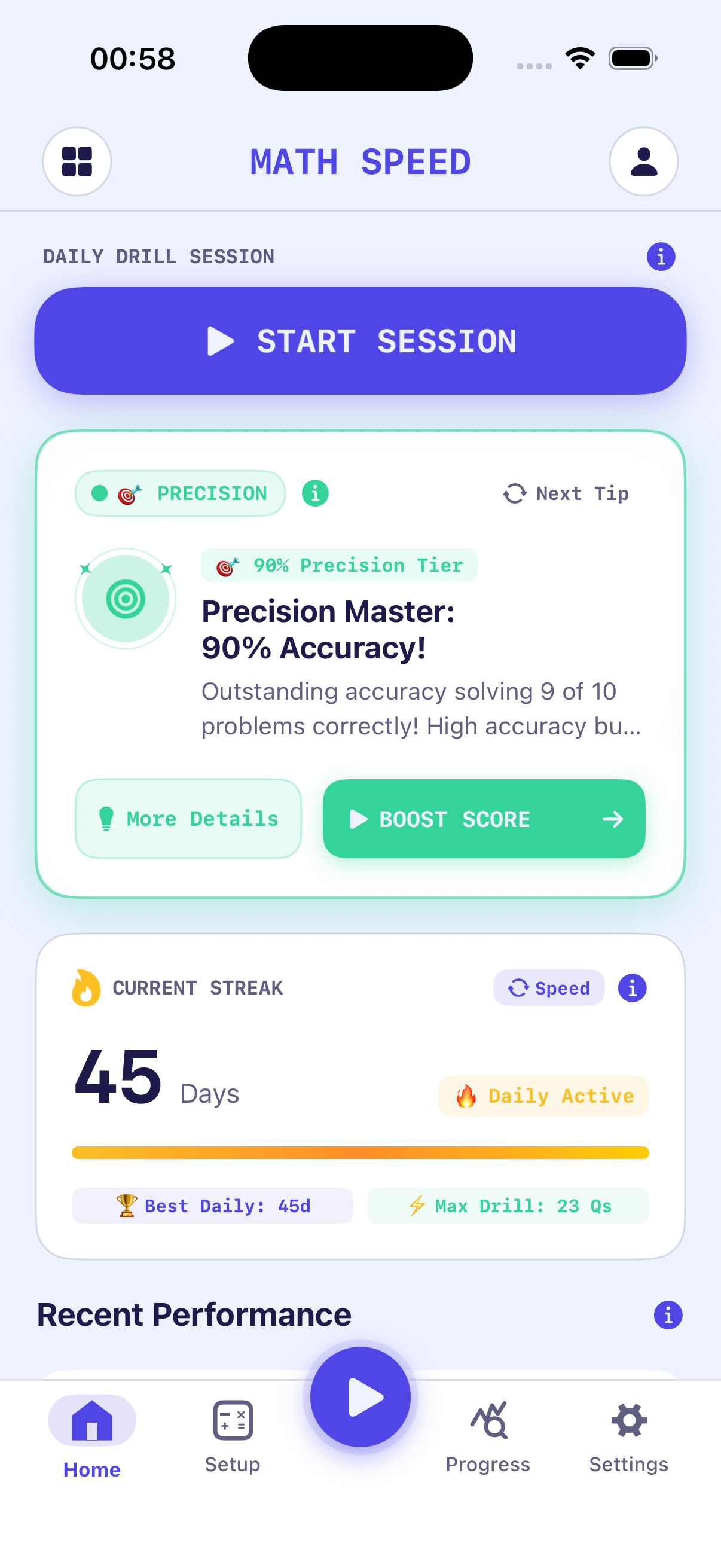
Here is a visual map and detailed plain-English guide to every view inside the Math Speed iOS and watchOS application.
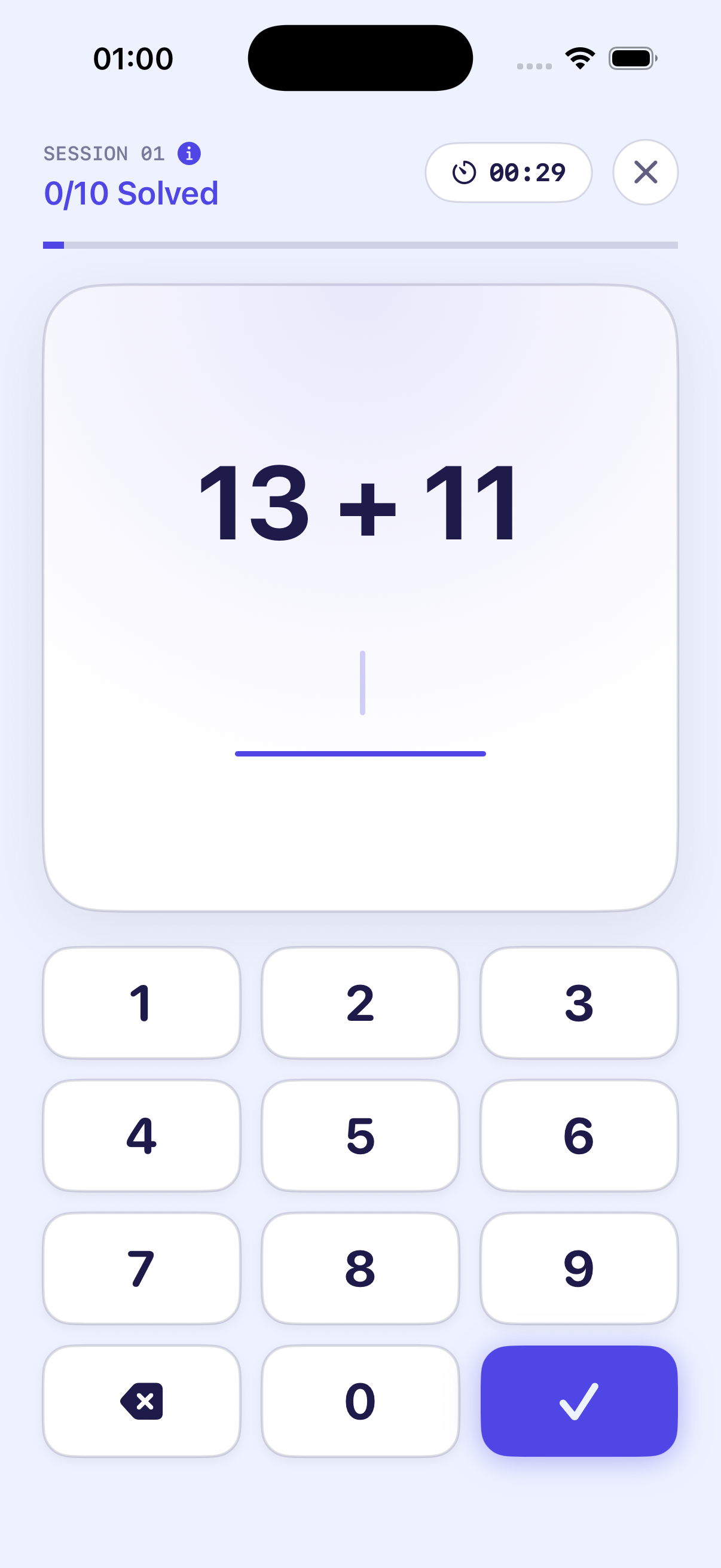
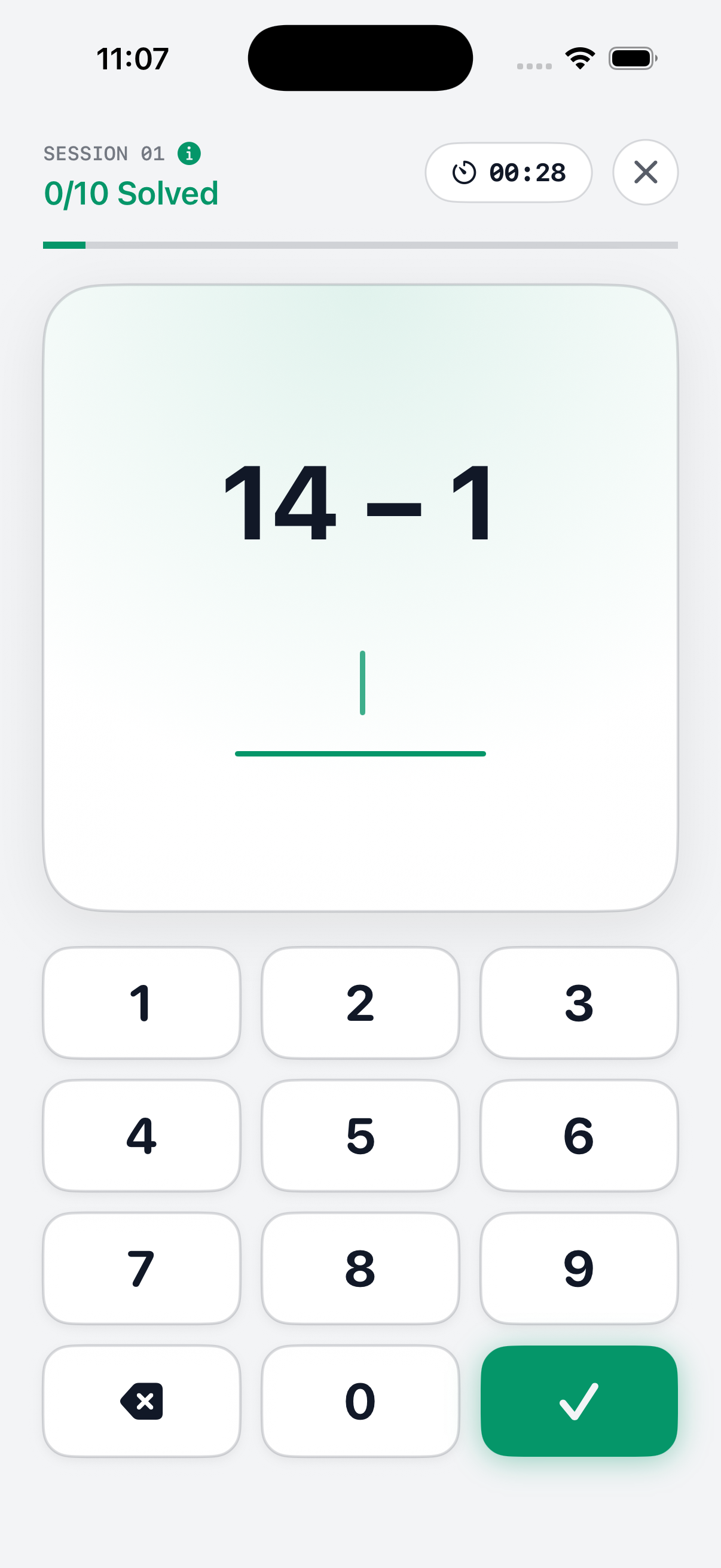
The Mental Math Drill Screen
This is the core arena where drills take place. It was designed with high-contrast typography and zero clutter so nothing distracts your eyes.
What You See On Screen:
- Top Bar: Displays the 30s Countdown Timer & Current Score counter.
- Center Box: Displays the current procedural equation in extra-large bold font.
- Bottom Grid: 4 large, easy-to-tap answer buttons formatted for fast thumb responses.
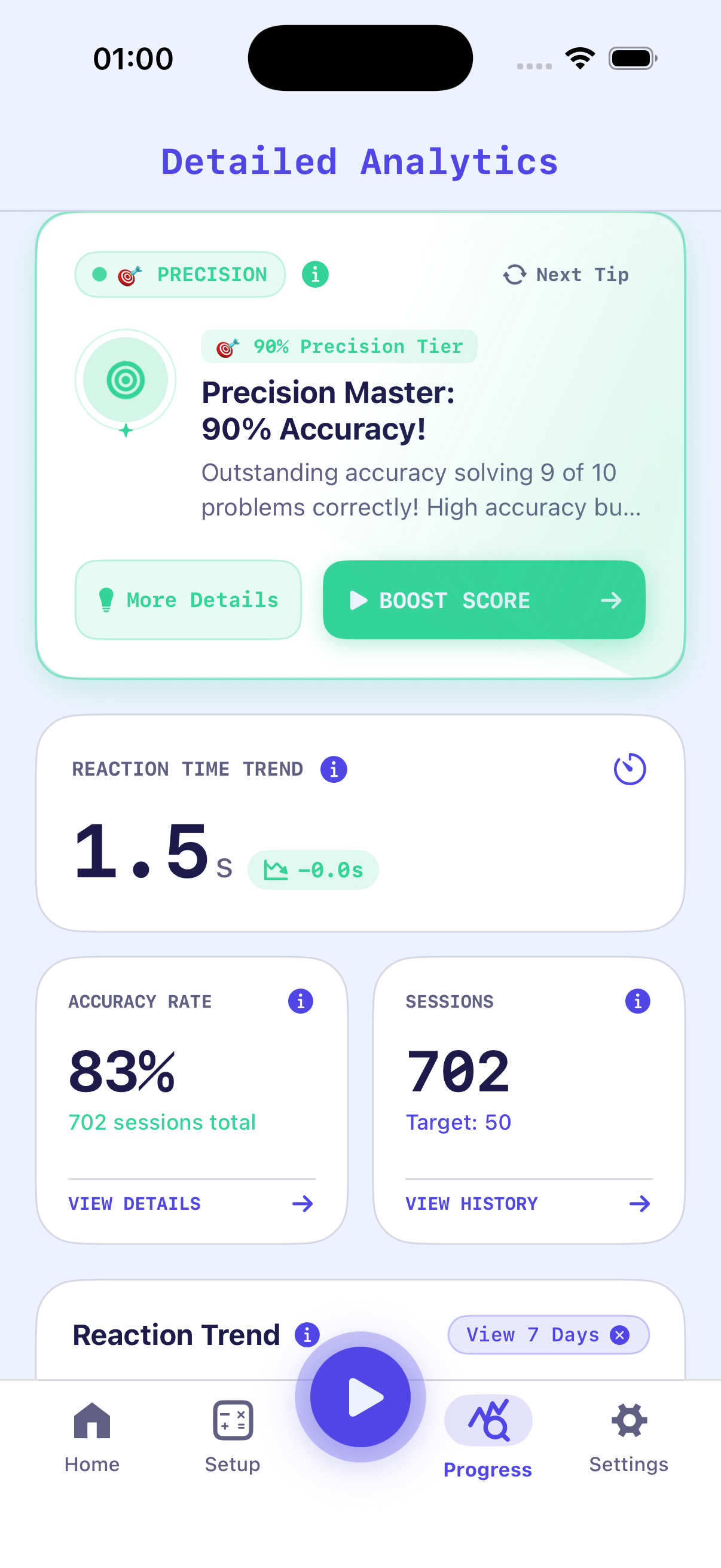
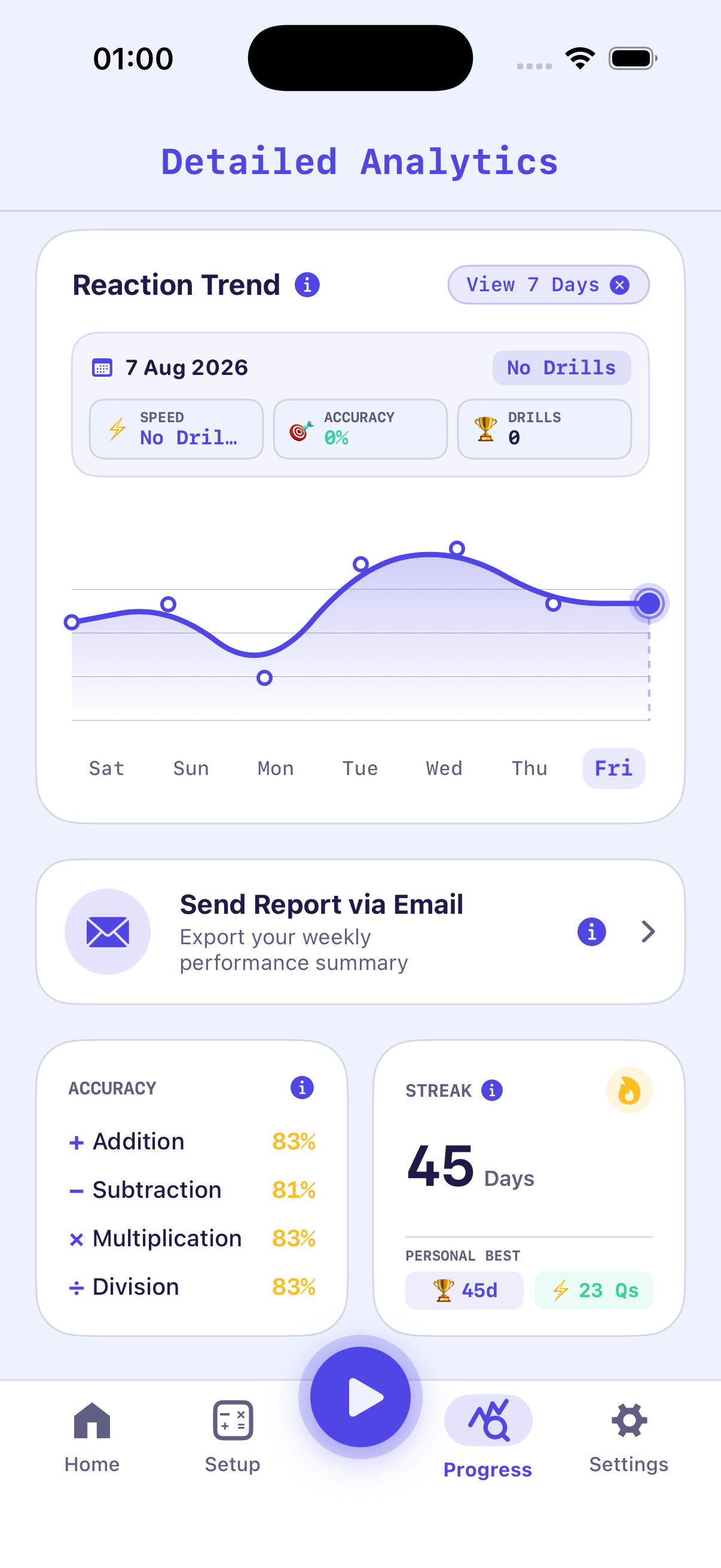
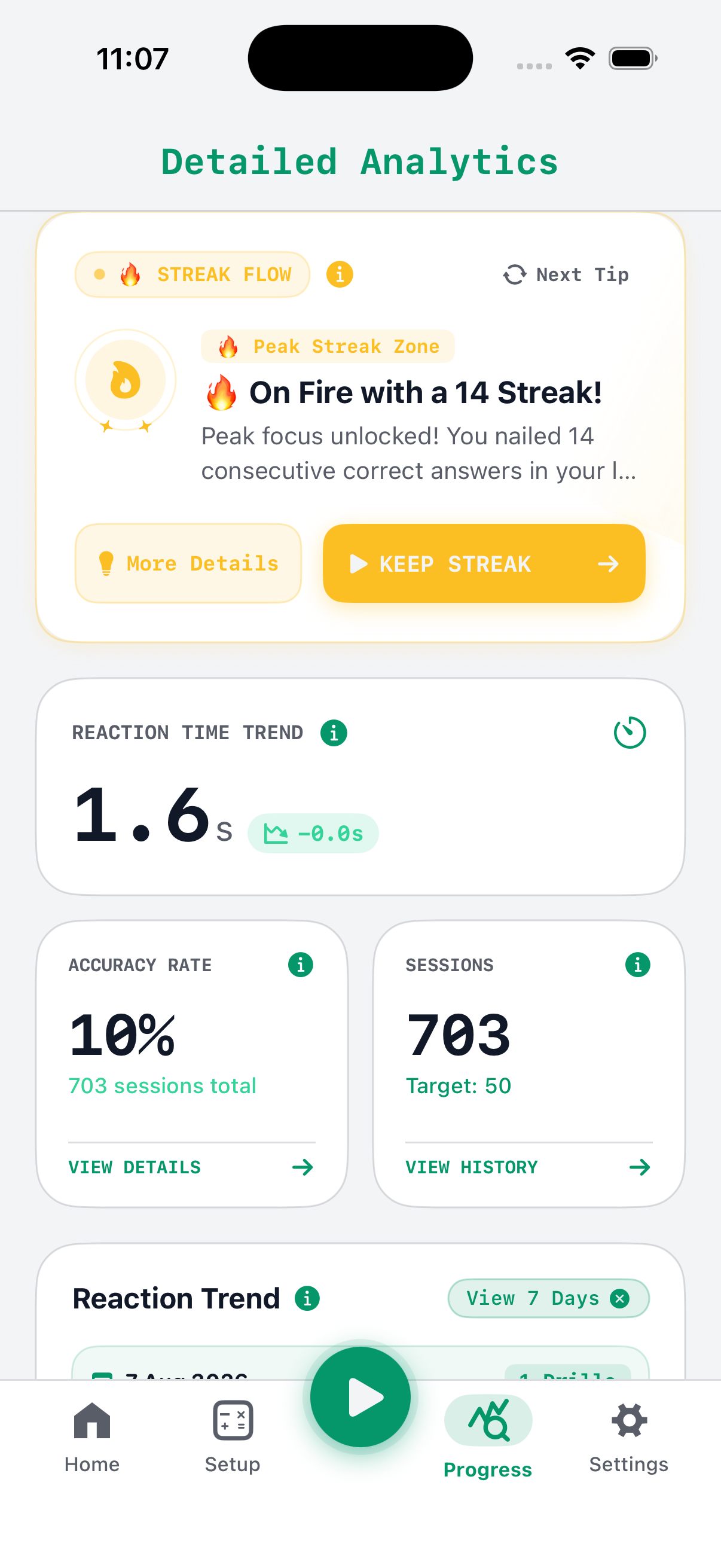
The SwiftData Analytics & Speed Curve Dashboard View
This view turns your raw practice data into visual charts, tracking your brain's cognitive speed development over days, weeks, and months.
What You See On Screen:
- Line Graph: Plots your average solution speed (in seconds) over time.
- Metric Cards: Highlights your Fastest Response (e.g. 0.38s) and Average Daily Score.
- Accuracy Dial: Shows your overall percentage of correct vs incorrect answers.
Custom Setup & Difficulty Settings View
Allows you to tailor your drill parameters to target specific weaknesses or match your exact skill level.
What You See On Screen:
- Operator Toggles: Enable or disable +, -, ×, ÷ individually.
- Number Sliders: Drag minimum and maximum number limits (e.g. 1 to 100).
- Haptic Switch: Toggle Apple Watch and iPhone vibration feedback ON or OFF.
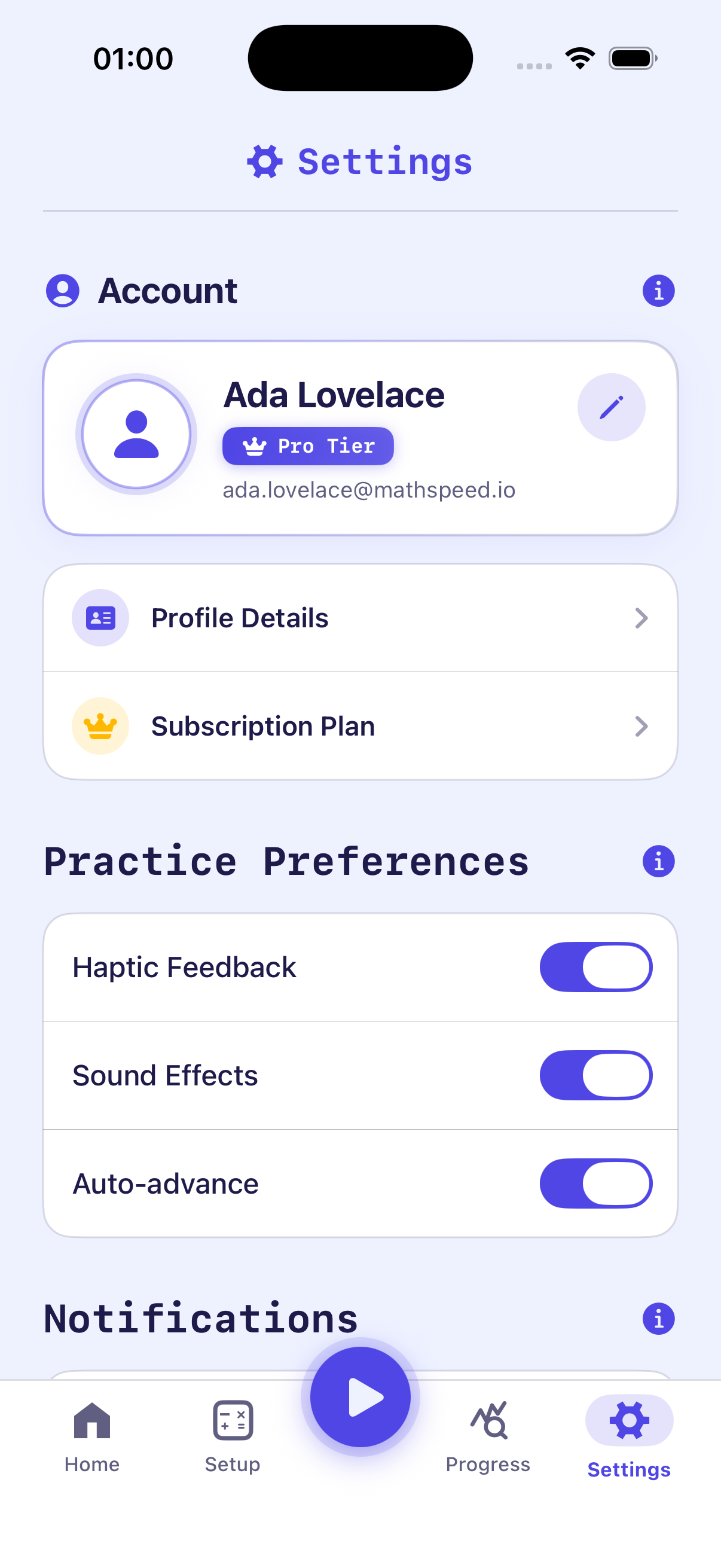
Personal Records & History Log View
A detailed log of all past 30-second sessions and high score achievements.
What You See On Screen:
- Trophy Cards: Shows your All-Time Longest Correct Streak (e.g. 24 in a row).
- Session History: Chronological list of completed drills with date & score timestamps.
- Data Export: Button to backup or reset your local performance history.
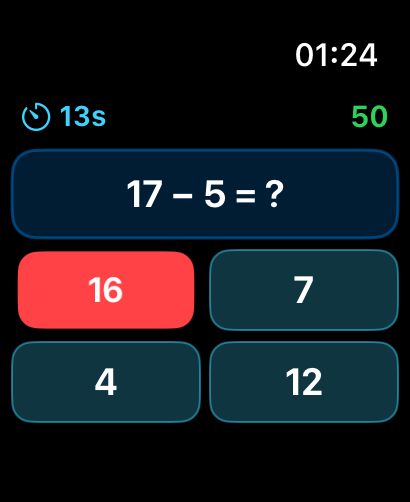
Standalone watchOS Apple Watch View
Specially engineered for small wrist screens, featuring simplified touch controls and instant launch.
What You See On Screen:
- Mode Launcher: Quick tap buttons to start Addition or Multiplication drills.
- Compact Equation: High-visibility numbers optimized for Apple Watch OLED displays.
- Score & Haptic Pulse: Instant wrist vibration tap for every correct answer.
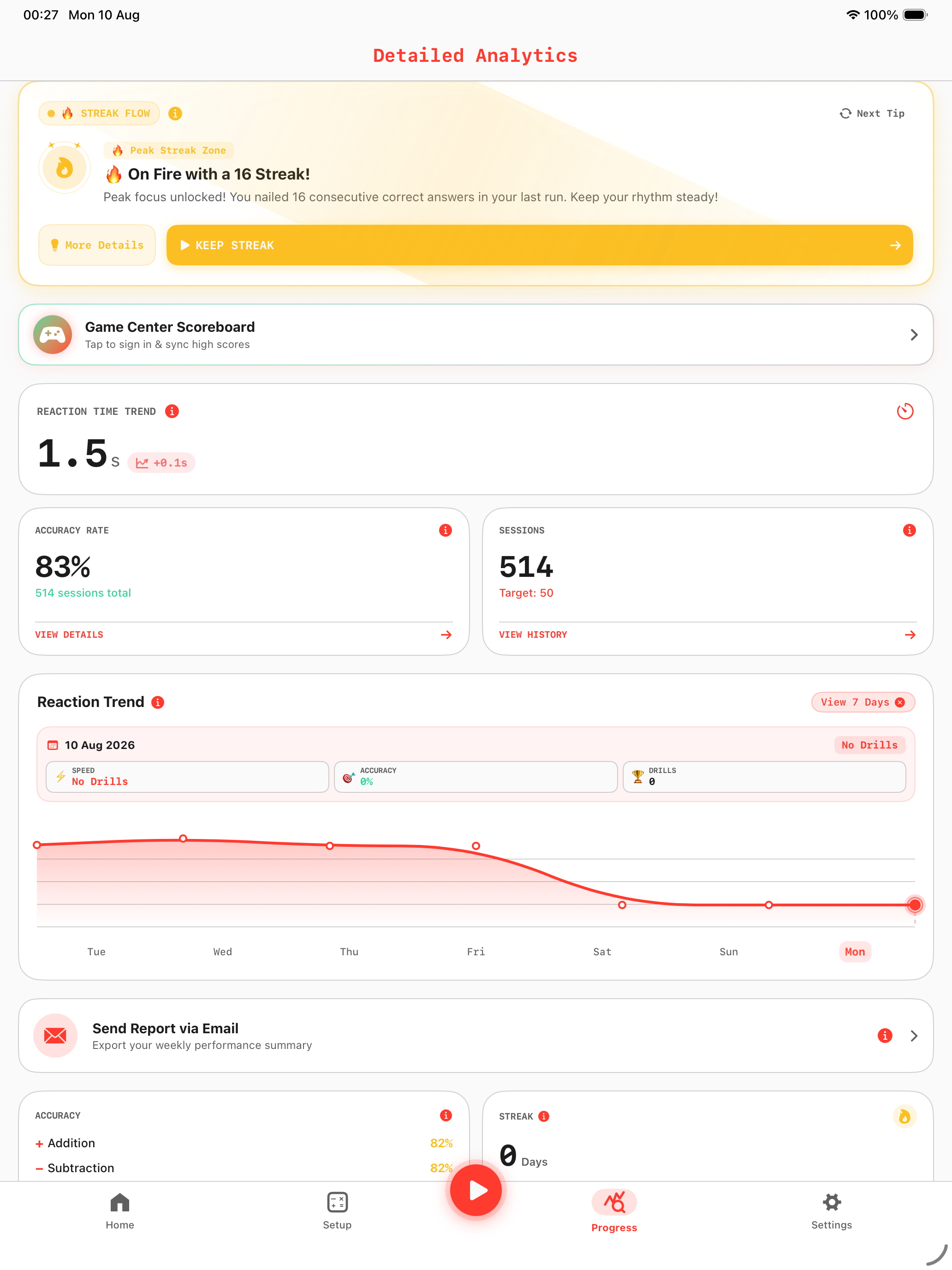
iPad Pro Large Canvas & Telemetry Dashboard
Optimized for iPad Pro screens (including 13-inch M5 models), featuring multi-column analytics layouts, expanded streak zones, and side-by-side equation practice.
What You See On Screen:
- Multi-Column Dashboard: Side-by-side view of live drills, streak milestones, and reaction telemetry graphs.
- Tablet Touch Controls: Expanded tap targets designed for ergonomic multi-touch input on iPad glass.
- Full Game Center Hub: Integrated iPad view for leaderboards, achievements, and custom practice settings.
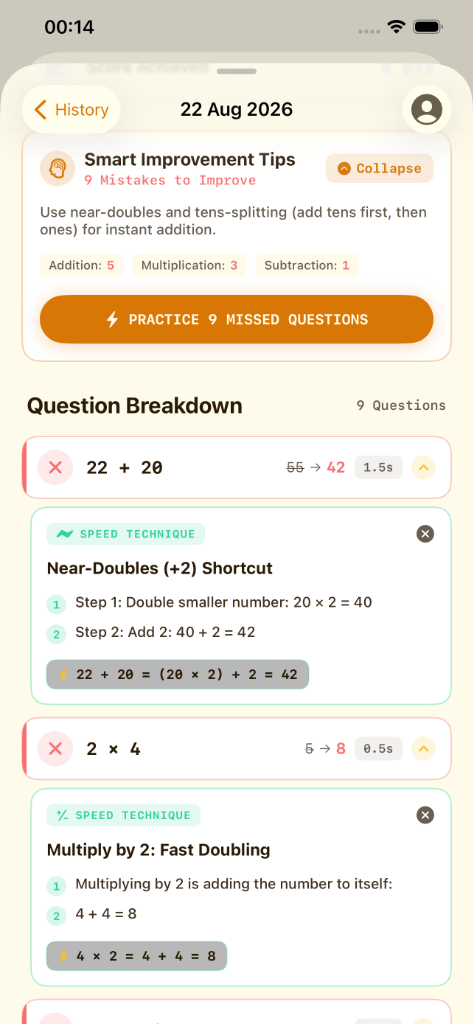
Smart Improvement Tips & Question Breakdown
An intelligent post-drill coaching breakdown that aggregates mistake counts by operator, explains high-yield cognitive tricks, and allows instant re-testing.
What You See On Screen:
- Smart Improvement Tips Card: Highlights operator mistake counts (e.g. Addition: 5, Multiplication: 3, Subtraction: 1) with high-level advice like "Use near-doubles and tens-splitting".
- ⚡ Practice Missed Questions Button: One-tap re-drill to immediately practice only your failed equations and build instant muscle memory.
- Question Breakdown & Latency: Displays your chosen answer vs the correct value (e.g.
22 + 20:55 ➔ 42) and exact response time (1.5s). - Speed Technique Step-by-Step Cards: Clear step-by-step shortcuts like Near-Doubles (+2) (
20 × 2 = 40; + 2 = 42) and Fast Doubling (4 + 4 = 8).
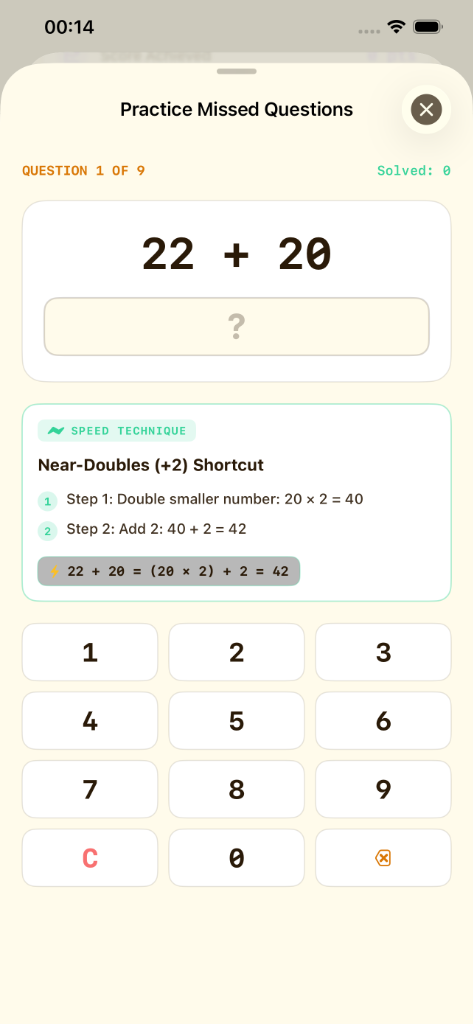
Practice Missed Questions: Interactive Retest Arena
The interactive deliberate practice workout launched when tapping "Practice Missed Questions". It provides real-time Speed Technique guidance above the numeric keypad.
What You See On Screen:
- Live Progress Header: Real-time question counter (
QUESTION 1 OF 9) and total solved tally (Solved: 0). - Inline Speed Technique Card: Context-aware shortcut formula rendered above the keypad (e.g. Near-Doubles (+2) Shortcut: 20 × 2 = 40; + 2 = 42).
- Tactile 12-Key Numeric Pad: Clean 3×4 numerical input layout featuring dedicated Clear (
C) and Backspace (⌫) actions. - Modal Focus Mode: Zero-distraction presentation sheet focused purely on mastering previously missed arithmetic operations.
20 Designer Color Themes & Display Customizer
Tailor the aesthetic personality of Math Speed across 20 distinct palettes spanning Playful, Minimalist, Cyberpunk, and Warm categories.
What You See On Screen:
- 20 Dynamic Color Themes: Live-rendered palette swatches with one-tap instant application.
- Light & OLED Dark Mode: High-contrast tokens calibrated for direct sunlight and battery-saving night training.
- Custom Typography Scaling: Clear legibility tokens configured for fast visual operand acquisition.
Game Center Multi-Operation Achievements Hub
Track your arithmetic achievements and global standings directly in Apple Game Center with operator-specific medal tracks.
What You See On Screen:
- Multi-Operation Badges: Dedicated achievement tiers for Addition, Subtraction, Multiplication, and Division.
- Difficulty Tier Milestones: Medals for mastering Easy, Medium, Hard, and Insane number ranges.
- Global Leaderboards: Compare High Scores and All-Time Max Streak records against players worldwide.
5-Slide Interactive Onboarding Experience
A smooth first-launch walkthrough that personalizes your training goals, enables tactile feedback, and sets your starter theme.
What You See On Screen:
- Goal Selection: Tailor drills for Exam Prep, School Fluency, Daily Brain Fitness, or Competitive Math.
- Sensory Setup: Test and calibrate CoreHaptics tactile wrist vibrations and audio feedback.
- Theme Picker: Choose your favorite starting palette out of 20 designer options.
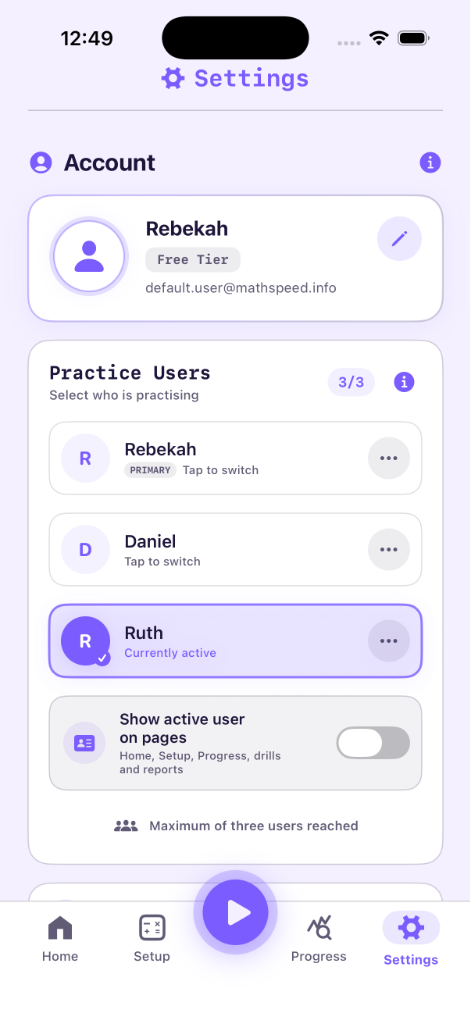
3 Practice User Profiles & Settings Switcher
Switch seamlessly between up to 3 individual practice profiles on one device with dedicated data stores and automatic safety confirmations when settings or reports change.
What You See On Screen:
- Practice User Selector: Fast 1-tap switcher with Primary and Active user badges (e.g. Rebekah, Daniel, Ruth).
- Capacity Indicator: Clear count badge (
3/3) showing available practice profile slots. - Show Active User on Pages: Toggle to display active practice member name on Home, Setup, Progress, and Reports.
- Isolated History & Analytics: Each user's reaction speeds, accuracy %, and problem streaks are tracked independently in local SwiftData.
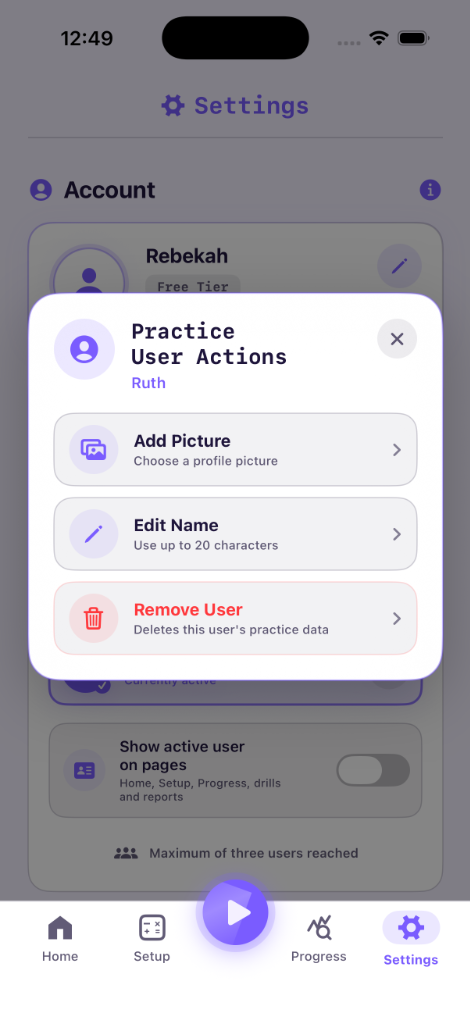
Practice User Actions & Customization Sheet
Easily personalize each practice member with profile images, personalized names, and individual data control.
What You See On Screen:
- Add Picture: Choose a personalized photo or avatar image for each family member or student.
- Edit Name: Customize profile identifiers using up to 20 characters.
- Remove User & Clear Data: Safe profile deletion that removes practice records for that specific member without impacting others.
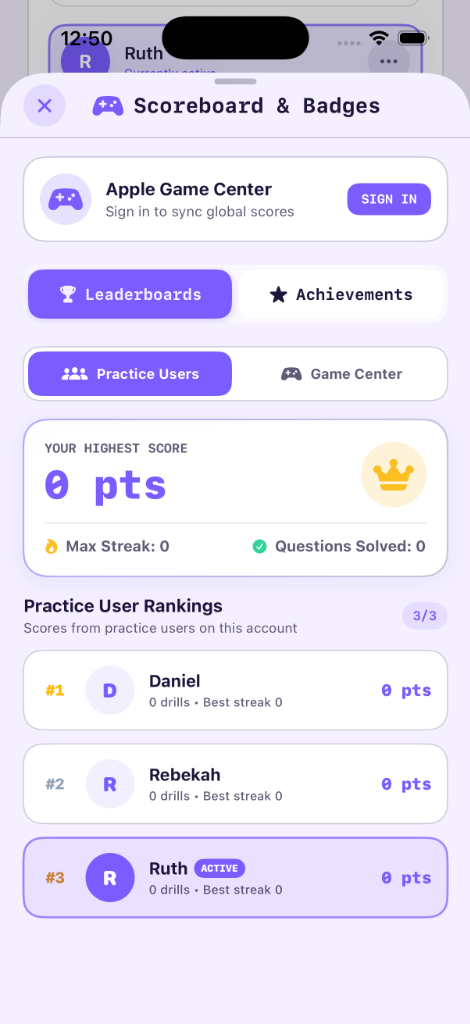
Scoreboard & Practice User Rankings
Compare local high scores, streaks, and drills completed across all practice users under your account.
What You See On Screen:
- All-Time Highest Score: Highlights your top drill performance with gold crown trophy styling.
- Podium Leaderboard: Live #1, #2, #3 rankings among household practice users with drill counts and best streak metrics.
- Apple Game Center Integration: One-tap toggle between local household rankings and global worldwide leaderboards.
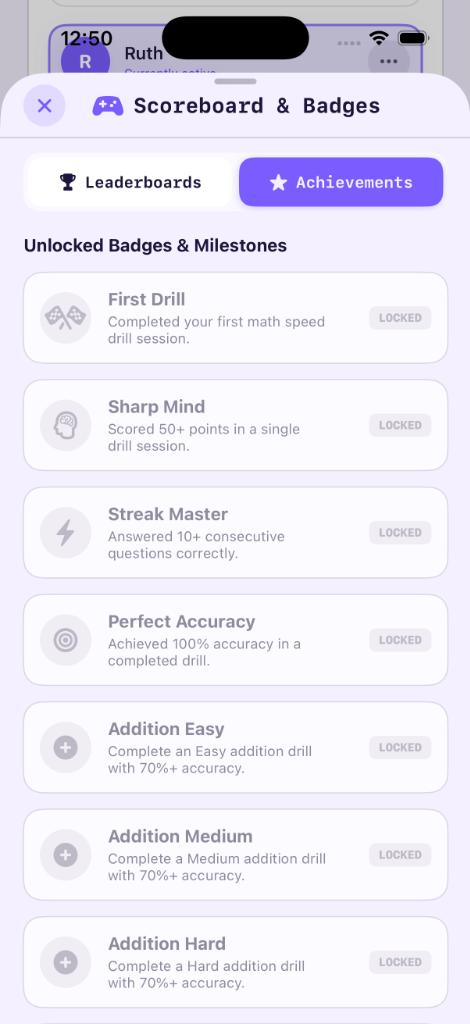
Badges & Milestone Achievements Hub
Unlock 20+ medals celebrating arithmetic mastery, streak records, speed velocity, and multi-operator accuracy.
What You See On Screen:
- Core Milestones: First Drill, Sharp Mind (50+ points), Streak Master (10+ streak), and Perfect Accuracy (100%).
- Multi-Operator Tiers: Addition Easy, Addition Medium, Addition Hard, Multiplication, Subtraction, and Division mastery medals.
- Live Unlock State: Real-time progress synchronization with Apple Game Center.
Simple, Honest Pricing. Zero Ads.
Try Math Speed completely free with daily 60-second workout refills, or start a 3-Day Free Trial on our Monthly Pass. Upgrade via Apple StoreKit 2 for unlimited training across all your devices.
Free Starter
- 2-Min Starter Allowance
- 60s Daily Free Refill (Every 24h)
- 30-Second Speed Sprints
- Basic Performance History
- 100% Offline & Zero Ads
Monthly Pass
- 3-Day Free Trial Included
- All Operators: +, −, ×, ÷
- 3 Practice User Profiles
- Smart Mistake Coaching & Retest
- Standalone Apple Watch App
- Detailed Speed Charts & Latency
- 100% Ad-Free Practice
Annual Pass
- All Operators: +, −, ×, ÷
- 3 Practice User Profiles
- Smart Mistake Coaching & Retest
- Household Scoreboard Podium
- Apple Game Center Achievements
- Standalone Apple Watch App
- Detailed Speed Charts & Latency
- Priority Support & 100% Ad-Free
Lifetime Pro Pass
- All Operators: +, −, ×, ÷
- Apple Family Sharing (Up to 6 IDs)
- 3 Practice User Profiles & Avatars
- Smart Mistake Coaching & Retest
- Times Tables Mode: 1–12 Selection
- Target Operand Modes: 1st, 2nd, Mixed
- Standalone Apple Watch App
- Household Scoreboard & Game Center
- Full Data Sovereignty: JSON & CSV
- 100% Ad-Free & Offline Forever
Subscription Terms: The 3-Day Free Trial is an introductory offer available on the Monthly Pass. Cancel anytime at least 24 hours prior to the trial conclusion in your Apple ID settings (Settings > [Your Name] > Subscriptions). If cancelled, you retain full Pro features until the 3 days end, then revert automatically to the complimentary 60-second daily practice refill with zero charges. Lifetime Pro Pass is a single one-time payment with Family Sharing for up to 6 members.